- Create an account. Currently this can be done using the register link or you can create an account quickly using facebook
- Verify Account. If you signed up without facebook then you will need to verify your email address by clicking the link sent to you
- Once Verified and logged in click on the Download link above the click the download button
- You will likely see the warning:

as it is an exe file and the site is new and therefore "untrusted". Click keep. - The file is a stand alone exe. It doesn't require installing so simply put it wherever you like and run it
- If you'd like it to open automatically when starting your computer you can move it to the startup directory (or create a shortcut there).
- Run the exe, right click it and click on account

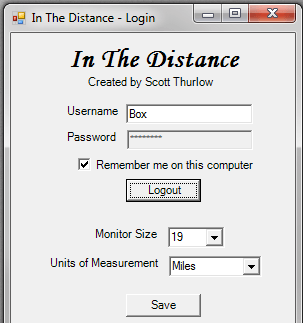
- Type in your account details and check the remember me if you'd like to auto login each time
- The tachometer will update with all your stats
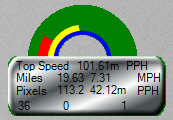
- The blue line is your top speed of all time
- The yellow line is your top speed of the session
- The red line is your current speed right this second